Features

What Procera does, and what it doesn't do yet

Grouped by the four pillars. Each feature's status is computed from the tracker epics it depends on when this site is built, so it can't drift from the plan. "Available now" means built on the main branch and covered by automated tests; the first packaged release, R1, targets Jan 2027.

Status comes from the delivery tracker:Available nowIn progressPlanned · R2 to GA

Design

Model and document processes

Write policies and SOPs in a block editor, review them with separation of duties, and publish on a schedule.

v1PolicyIn review

Policy and SOP library

Available now

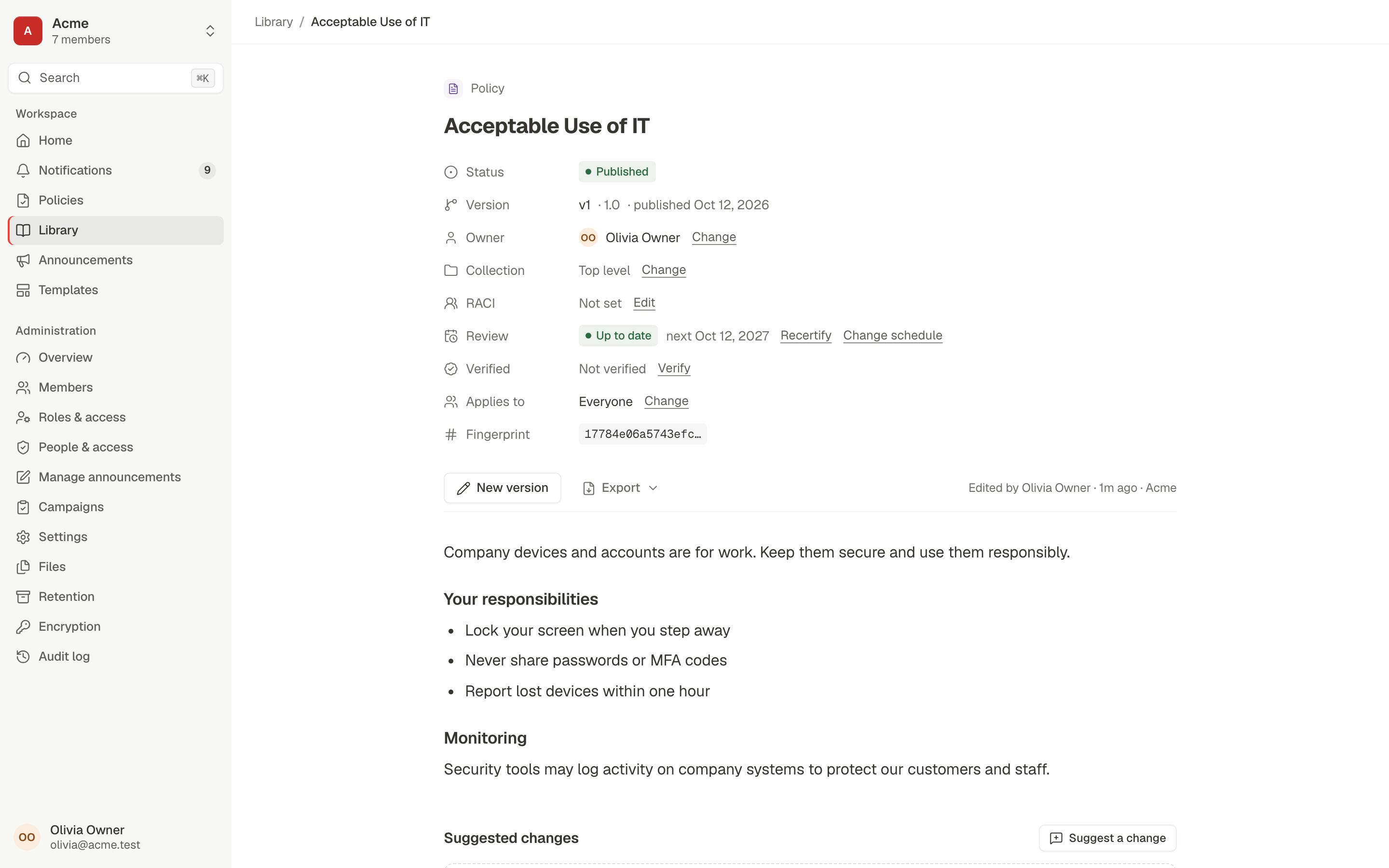
One governed home for policies (what and why) and SOPs (how), each with an owner, a version history and a lifecycle.

  • Lifecycle: draft, in review, approved, scheduled or published, deprecated, retired
  • Collections with per-collection visibility; restricted policies and applicability rules
  • A Policies portal for employees, with what changed between versions
  • Permission-filtered full-text search across documents and people

Tracker: BPMS-040, BPMS-041, BPMS-045, BPMS-049 done

A published policy, Acceptable Use of IT, with its status, version, owner, review date, applicability and content fingerprint above the policy text

Block editor and exports

Available now

A structured editor for SOPs and policies, validated on the server, with exports for readers.

Tracker: BPMS-042 done

  • Headings, lists, callouts, tables and images with a required description (alt text)
  • Markdown shortcuts and a single-tab-stop accessible toolbar
  • Export a published document to print or PDF, Word or Markdown

Reviews with separation of duties

Available now

Controlled documents go through review. Authors can't approve their own work, and approvals ask the reviewer to confirm it's them.

Tracker: BPMS-040, BPMS-043, BPMS-044 done

  • Self-approval is refused; the reviewer confirms with step-up authentication
  • Request changes with a comment; the author is notified, edits and resubmits
  • Word-level compare between any two versions
  • Suggested changes from readers, accepted or declined by the owner

Scheduled publication and review dates

Available now

Approve now, go live on the effective date. Every document carries a review cadence so nothing quietly goes stale.

Tracker: BPMS-044, BPMS-045 done

  • Effective-date scheduling; the previous version is marked superseded
  • Review cadence per workspace or per document, with recertify and verification
  • A major version can ask everyone to acknowledge again

Starter templates

Available now

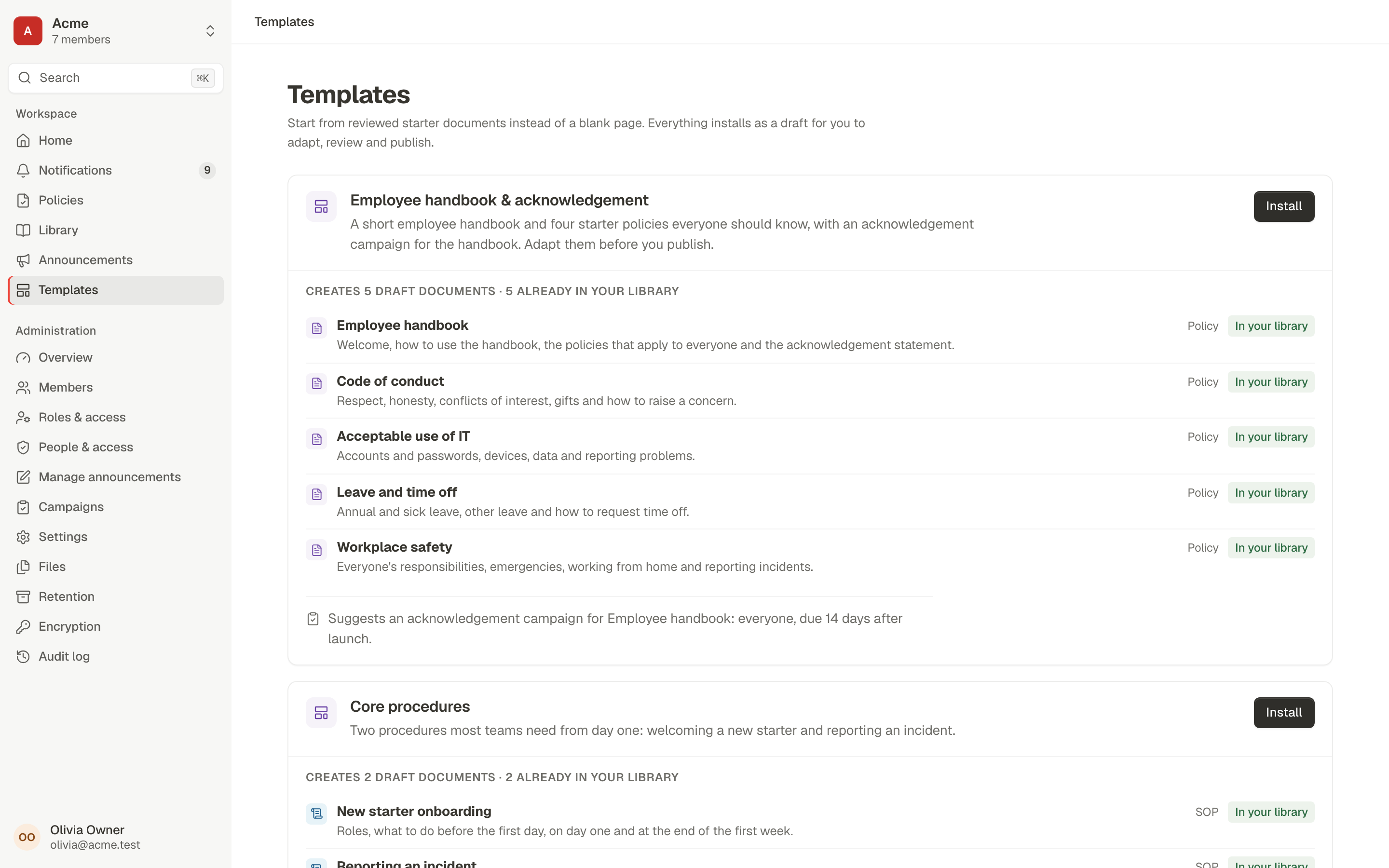
Start from reviewed starter documents instead of a blank page. Everything installs as a draft for you to adapt, review and publish.

  • Employee handbook pack: a handbook and four starter policies, plus a suggested acknowledgement campaign
  • Core procedures pack: new starter onboarding and reporting an incident

The larger gallery of ready-made workflow templates (leave, expenses, purchasing, access and more) depends on the workflow engine and is planned with it.

No separate epic; verified by browser test E2E-R1-18

Templates: the Employee handbook and acknowledgement pack, which installs five draft policies and suggests an acknowledgement campaign

Workflow template gallery

Available now

About 55 ready-made processes across HR, Finance, IT, GRC, Quality, Legal and Operations, with an install wizard and test runs.

Tracker: BPMS-106 done

  • Install wizard that maps roles and fields to your workspace
  • Every template test-runs green before it ships
Execute

Automate work across people and systems

Ask people to read and acknowledge, send announcements with receipts, and (from R2) run requests and approvals.

Confirm by FriAKBBCC2/3

Acknowledgement campaigns with evidence

Available now

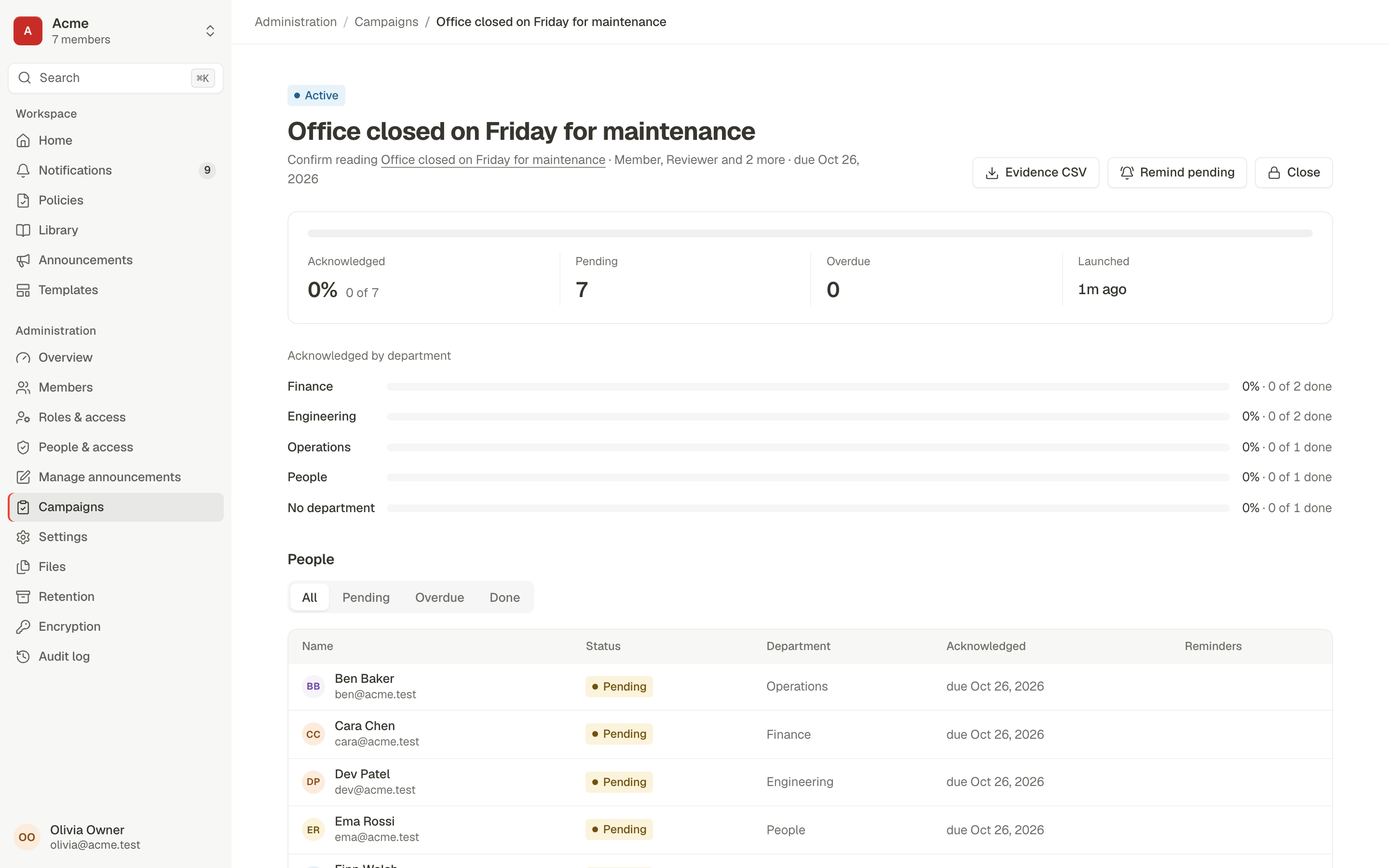
Ask people to read and acknowledge a specific version, chase them politely, and export evidence that stands up later.

  • Audience as a snapshot or kept up to date; people who join later can be included automatically
  • Reminders and manager escalation after the due date
  • Each acknowledgement is bound to the version and its content hash
  • Evidence CSV with version hash and sign-in method; progress by department

Tracker: BPMS-046 done

An acknowledgement campaign showing acknowledged, pending and overdue counts, progress by department, and per-person status with an Evidence CSV button

Announcements with reach and receipts

Available now

Targeted news and notices, with an optional confirm-by date and approval before anything goes out.

  • Audience by department, group or location from the directory
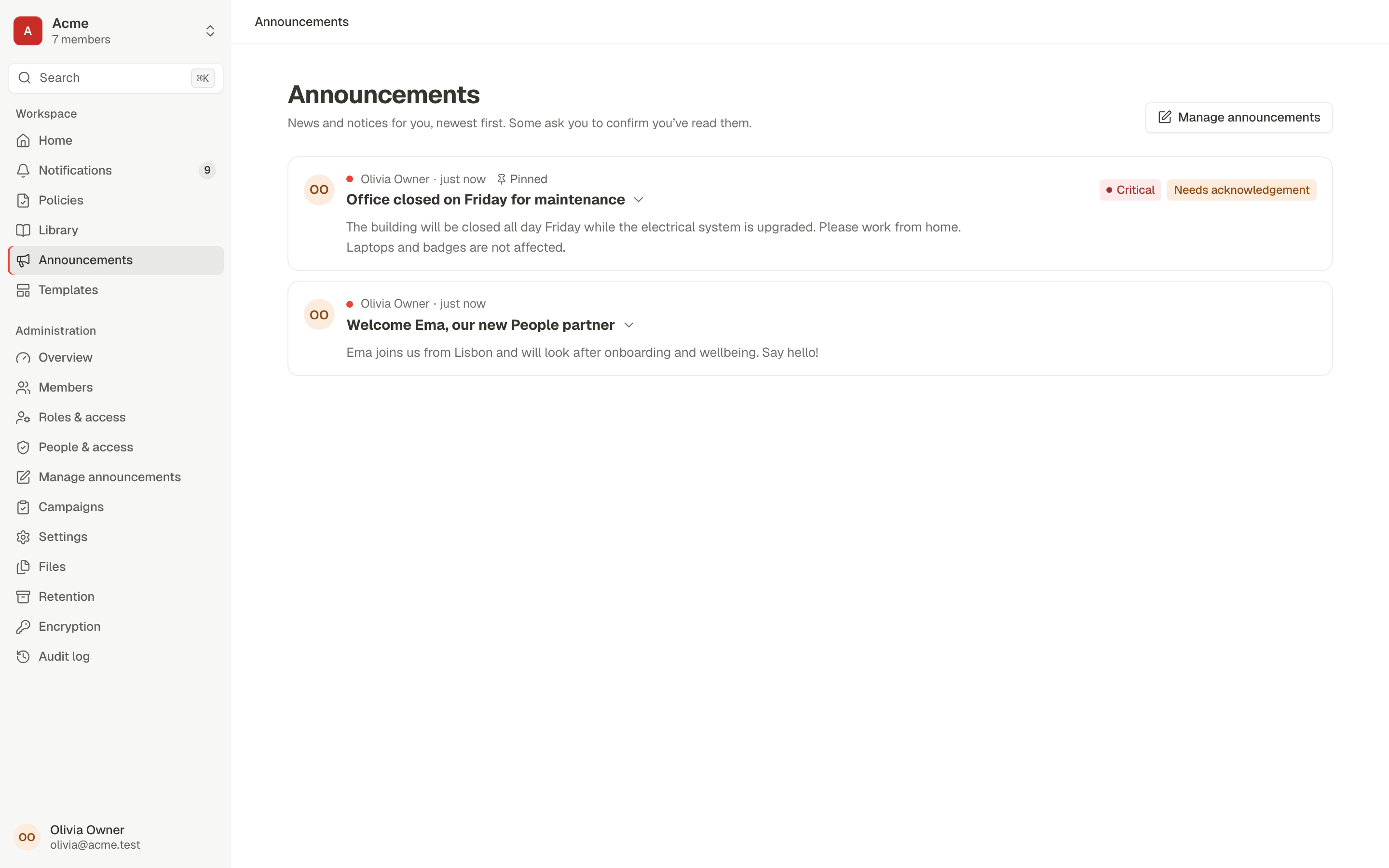
  • Schedule and expiry, pinned and critical posts
  • Required confirmation with a confirm-by date, reminders and manager escalation
  • Approval with separation of duties; reach and read receipts per post

Tracker: BPMS-047 done

The announcements feed with a pinned critical post that needs acknowledgement and a welcome post

Notifications and email

Available now

An in-app inbox plus email over your own SMTP server, with digests so people aren't flooded.

Tracker: BPMS-048 done

  • Templated, HTML-escaped emails with deep links back into the app
  • Daily or weekly digests at each member's hour and time zone
  • Per-member notification preferences

Workflow engine: requests and approvals

Available now

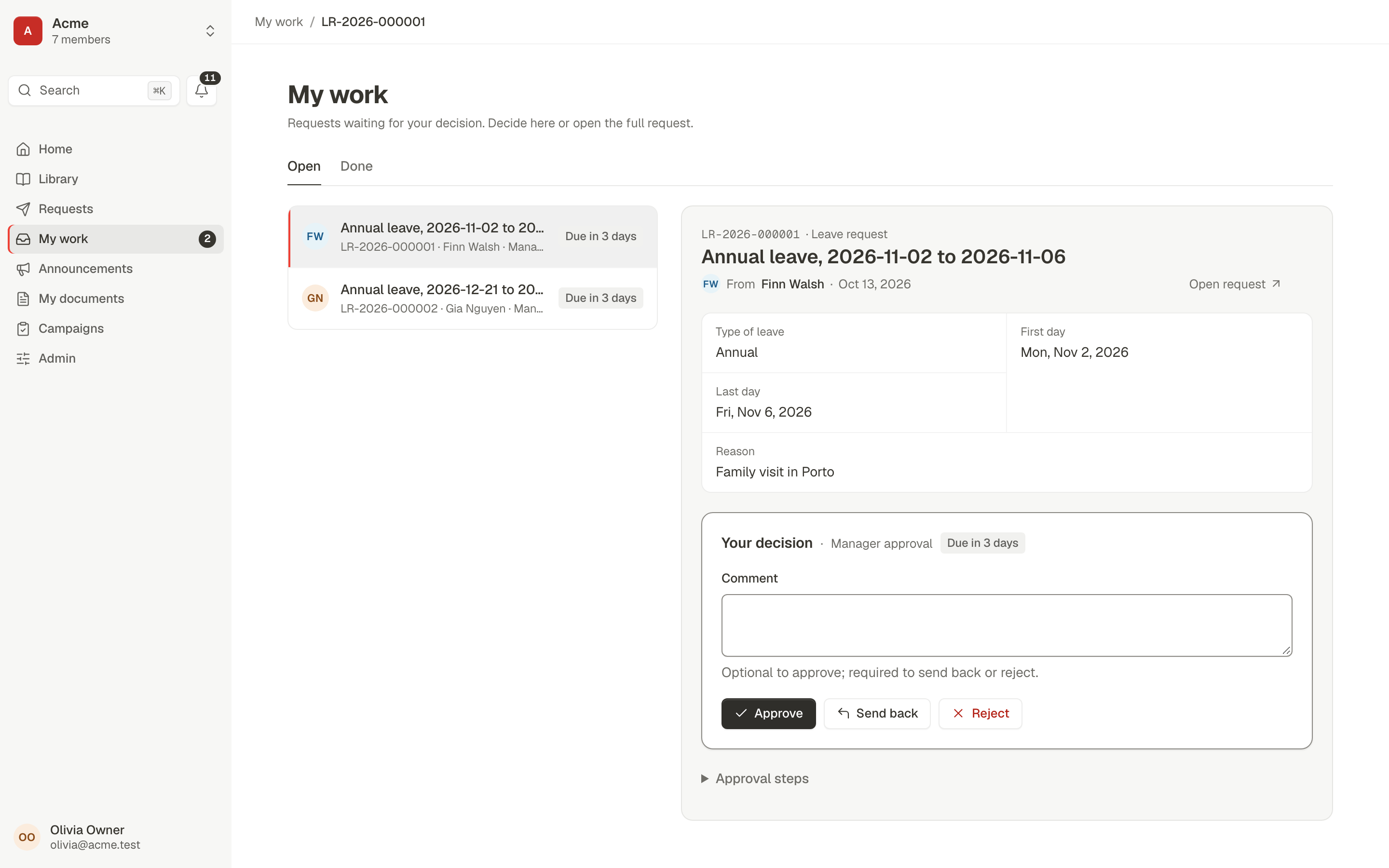
Requests and approvals run on Procera's own workflow engine. Five ready-made request types work today, and owners can now design their own in the Guided Studio, test-run them and publish them.

  • Leave, expense, purchase and access requests, routed to the requester's manager, finance, the CFO or IT by amount and sensitivity
  • A request page with approval steps, timeline and cancel; a My Work inbox to approve, reject or send back with a comment
  • Employee onboarding: IT, Facilities and the manager prepare at the same time, then the new member confirms equipment and handbook
  • Nobody approves their own request; one decision wins when two people act at once; every step is in the audit trail
  • Reminders before and at the due date; overdue manager approvals move up to the next manager, others alert the requester's manager
  • Admins see unassigned and overdue steps and reassign them with a reason (separation of duties still applies)
  • Guided Studio: a step builder for owners, with validation in plain language and test runs before publishing, plus a form builder with help, ranges, “show only when” questions, data classification and a phone preview, and a flow canvas that draws the same process as a diagram
  • A conversation on every request: comments, internal notes the requester never sees, @mentions and watchers
  • Operations view: technical incidents kept apart from people problems, retried or dismissed with a reason in the audit log
  • Team workload for managers: who holds what, what is overdue, who is away with work waiting, and bulk reassign within the team
  • Approve or reject from the email: the buttons open a confirm page through a single-use link, nothing is decided until you confirm
  • Out of office: one click from the account menu; colleagues see who's away and who covers on hover; a delegate decides your approvals, recorded on your behalf, and separation of duties still applies to them
  • Admins choose which request types are offered, who can ask for each, and the currency approval limits are read in
  • Before sending, the form says who will approve it; files (receipts, quotes, photos) attach to requests and decisions, virus-scanned and previewable; each decision records the policy version the approver saw
  • Parallel and quorum approvals (planned)

Tracker: BPMS-080, BPMS-081, BPMS-082, BPMS-083, BPMS-085, BPMS-086, BPMS-088, BPMS-100, BPMS-101, BPMS-103, BPMS-105 done


My work: open approvals on the left; the selected leave request with its details and Approve, Send back and Reject

Time off, holidays and attendance

In progress

Leave policies with balances you can explain, holiday calendars per location, a team calendar, shifts and clock-in attendance, alongside the onboarding you already run.

Tracker: 1 of 8 epics done (BPMS-222, BPMS-223, BPMS-224, BPMS-225, BPMS-226, BPMS-227, BPMS-228, BPMS-229)

  • Leave types and policies: yearly allowance, monthly accrual, pro-rating, carry-over and expiry
  • Every balance is a ledger: grants, requests, adjustments with a reason, year-end rollover
  • Request time off on a calendar that shows holidays and who else is out; half days counted
  • Team calendar and org chart; colleagues see Out, not why
  • Shifts and weekly rosters, clock in and out, missed-punch fixes with manager approval
  • Monthly attendance register, month close and a payroll-ready export; payroll and payslips later

Employee e-signing

In progress

Send documents to people or groups for signature, with an accessible signing ceremony and a certificate of completion.

Tracker: 0 of 1 epics done (BPMS-107)

  • Send a PDF to people in your workspace to sign one after another or all at once, with copies for others
  • Place signature, initials, date, name, text and checkbox fields by clicking the page (or from the keyboard)
  • A guided signing page on any screen: consent, a typed or drawn signature, Next field, decline with a reason
  • The signed copy has the values stamped in and a certificate of completion; its fingerprint is kept with the audit trail
  • Send one document to a whole group: each person signs their own copy, and one page shows who has signed
  • Automatic reminders, remind now, and an expiry date after which nobody can sign
  • Signing steps inside processes and external signers (planned)
Govern

Ensure compliance, control and visibility

Roles with scoped grants, a hash-chained audit log, encrypted files and workspace isolation enforced in the database.

#10417c1e…#1042a90f…#10433b2d…Chain verified

Directory with CSV import and locations

Available now

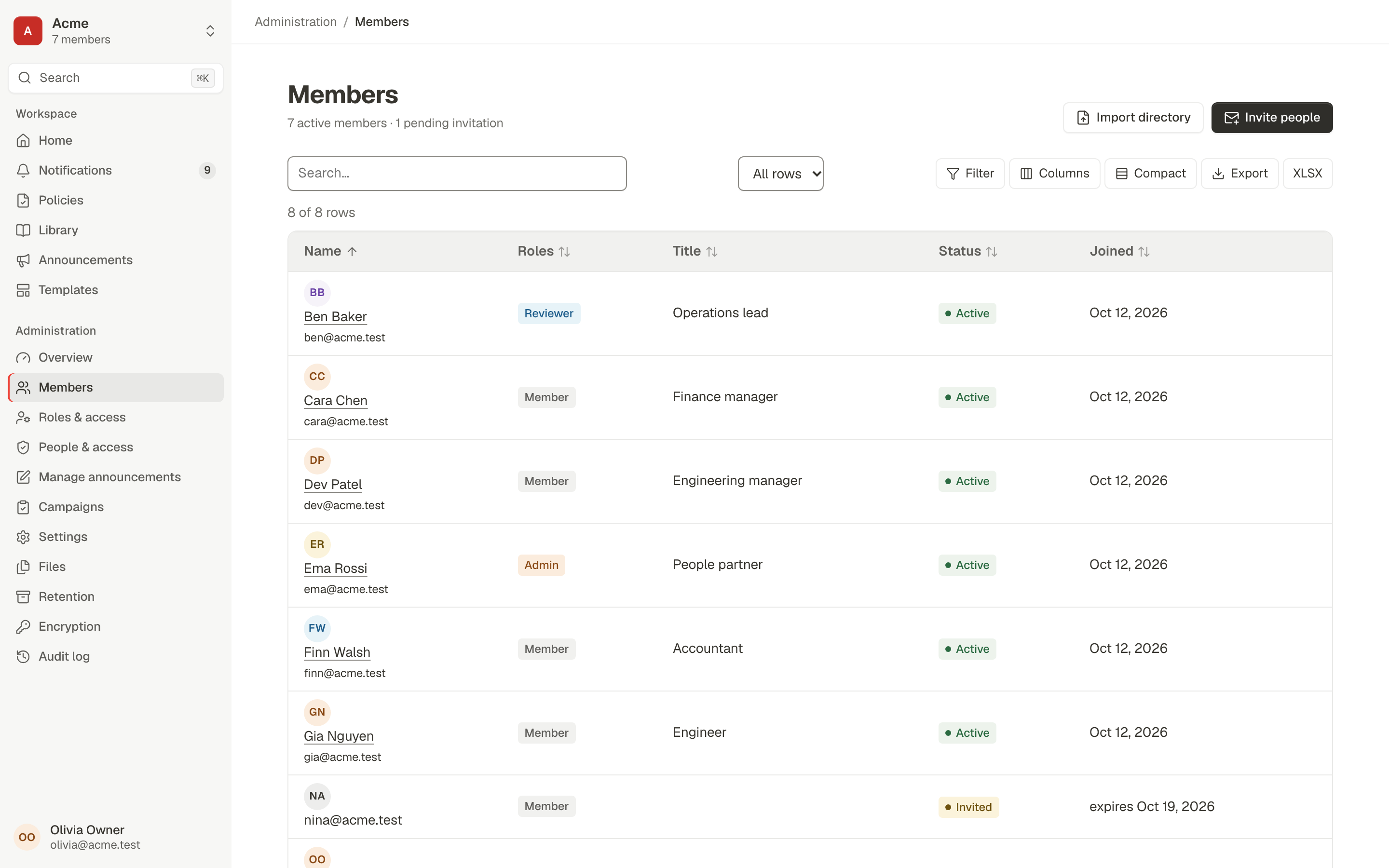
Invite people, import your org chart, and keep departments, managers and locations in one place.

  • Invitations by email: single use, bound to the address, expiring after seven days
  • CSV import with a check step that shows every row; manager cycles are refused
  • Departments, groups, positions, managers and locations used for targeting
  • Deactivating a member revokes their sessions immediately

Tracker: BPMS-023 done

Members: a sortable, filterable table of people with roles, titles and status, with Import directory and Invite people actions

Roles and scoped grants

Available now

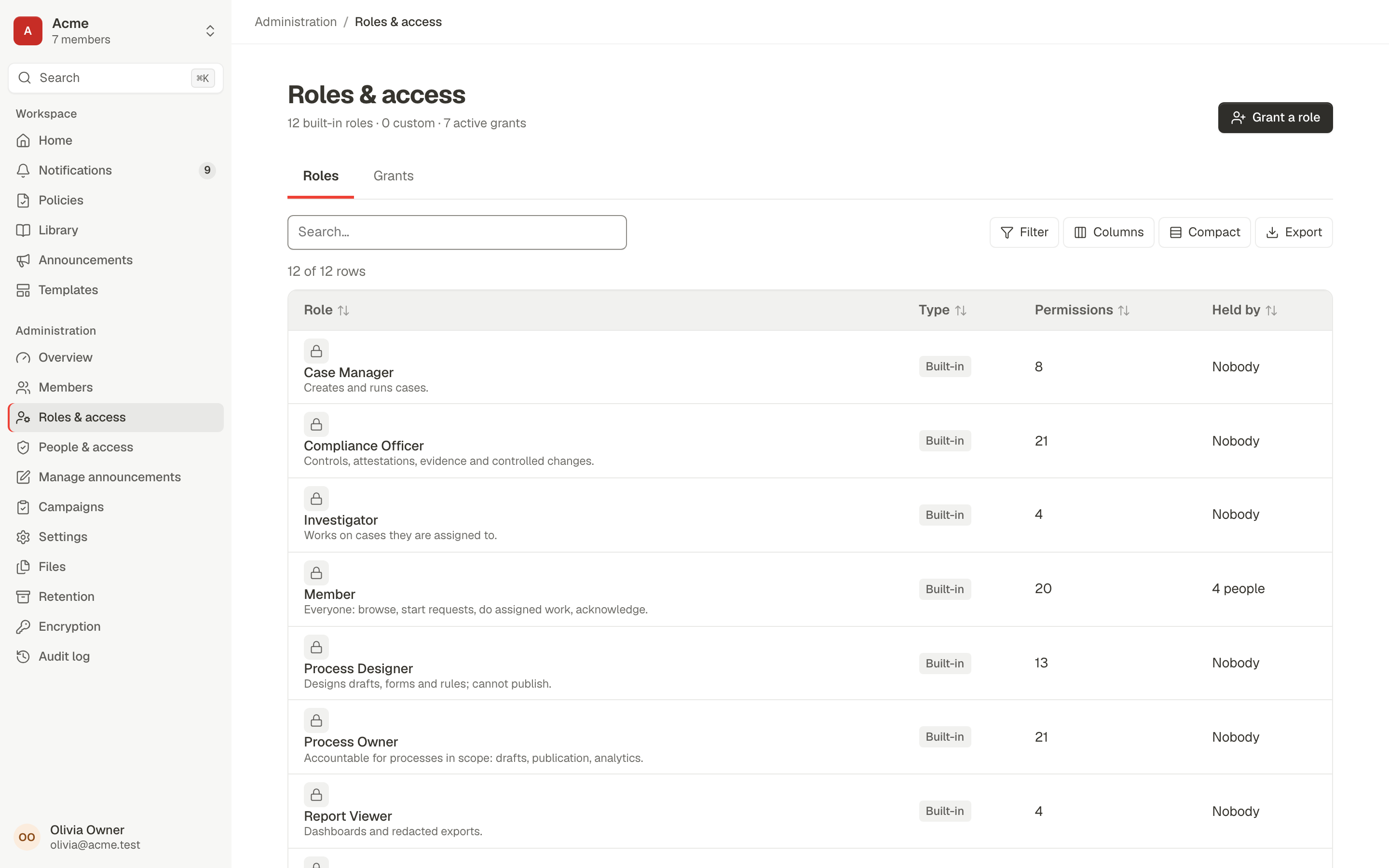
A permission catalogue, built-in role templates and custom roles, granted to people or groups and scoped to a department or collection.

  • 12 built-in role templates; custom roles cloned from them
  • Grants scoped to the workspace, a department or a collection
  • A preview of who gains or loses what before you save
  • No escalation: you can't grant a permission you don't hold

Tracker: BPMS-024 done

Roles and access: built-in roles such as Compliance Officer, Member and Process Owner with their permission counts and holders

Audit log with hash chain, explorer and exports

Available now

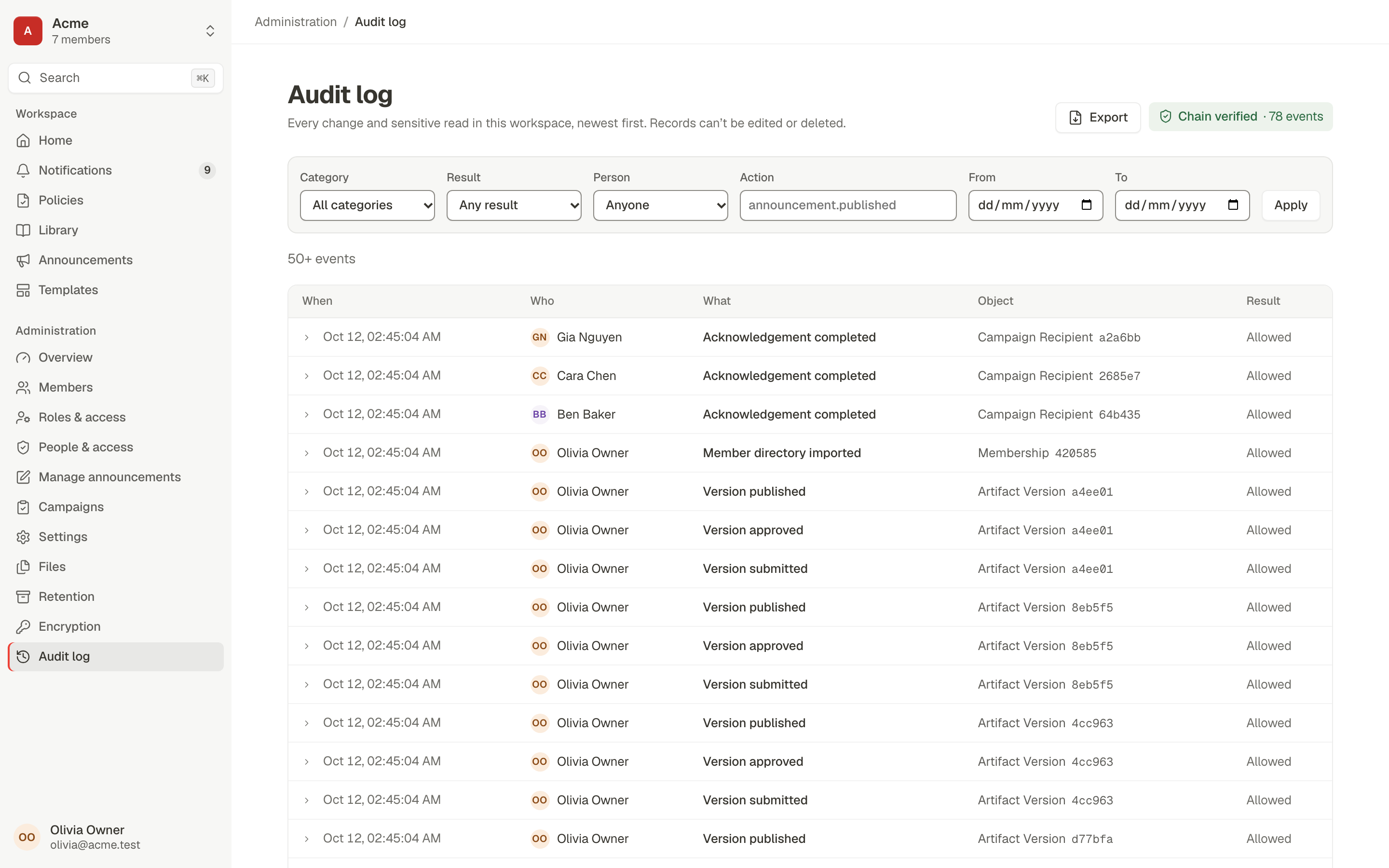
Every change and every sensitive read is recorded in a per-workspace hash chain. Records can't be edited or deleted.

  • Tamper-evident chain with verification in the product
  • Explorer with filters, person and document timelines, and saved queries
  • CSV and JSONL exports that need step-up and are themselves audited
  • Background exports for large ranges

Tracker: BPMS-026, BPMS-064 done

The audit log with filters for category, result, person and dates, a Chain verified badge with 78 events, and a list of who did what to which object

Sign-in, MFA and passkeys

Available now

Strong local sign-in out of the box, with two-step verification that admins can require by role.

  • Argon2id passwords, breached-password rejection, lockout and rotating sessions
  • Authenticator apps (TOTP), recovery codes, and passkeys or security keys
  • Step-up confirmation for sensitive actions
  • Workspace isolation enforced by PostgreSQL row-level security

Tracker: BPMS-021, BPMS-022, BPMS-025 done

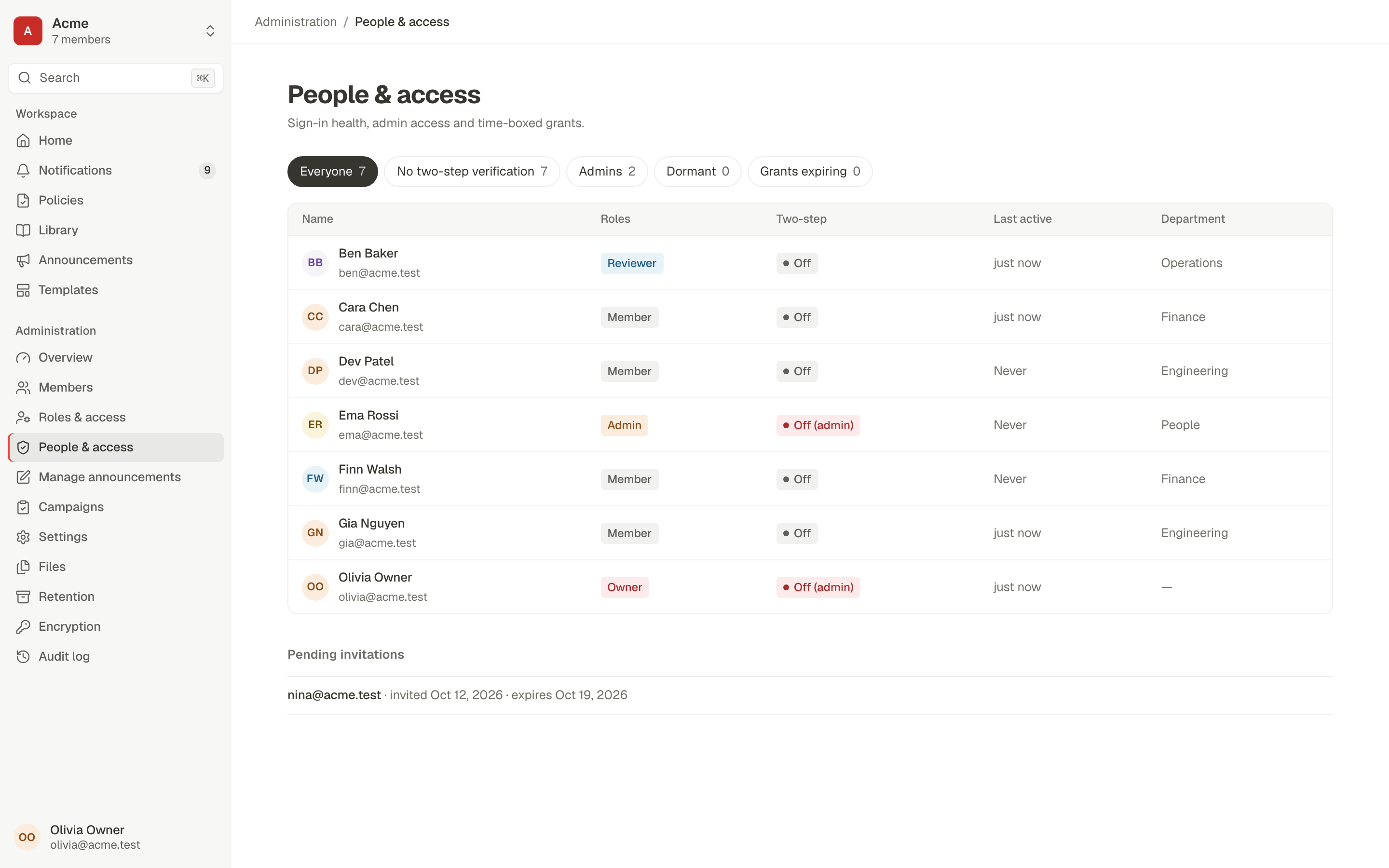
People and access: every member with roles, two-step verification status, last activity and department, with quick filters for admins and members without two-step verification

Files: scanning, encryption, retention and previews

Available now

Attachments are checked, encrypted and governed. Most of the pipeline works end to end; parts are still being finished.

  • Resumable uploads, SHA-256 and content-based type detection; executables, scripts, HTML and SVG are refused
  • Malware scanning through ClamAV, with quarantine
  • Per-file encryption under the workspace key; short-lived signed links
  • In-app previews of images, PDF (pages, zoom, search), Word and spreadsheets in a sandbox; retention classes honoured by jobs

Tracker: BPMS-060, BPMS-061, BPMS-062, BPMS-066 done

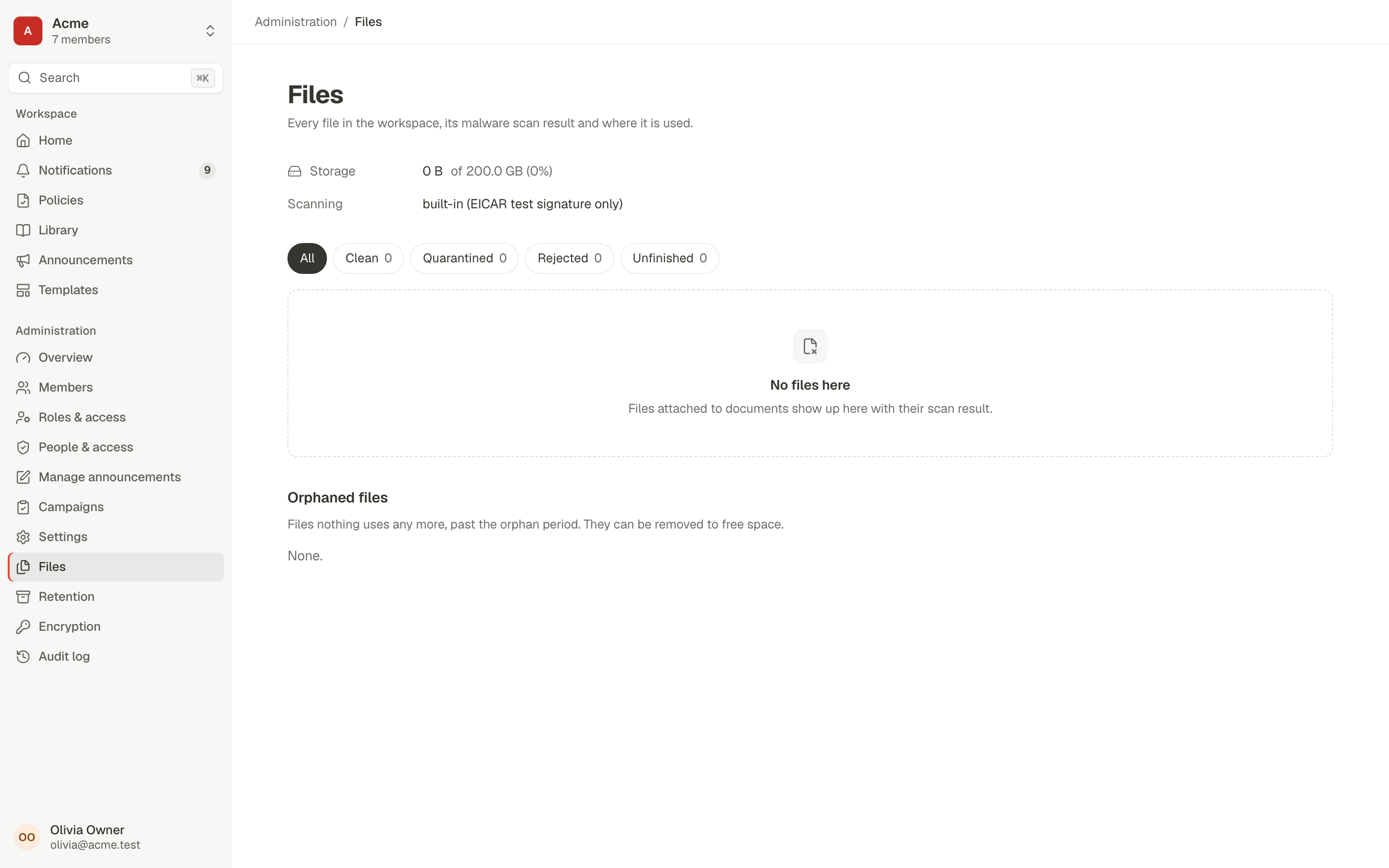
The Files admin view showing storage use against the quota, the malware scanner in use, scan-state filters and orphaned files

Envelope encryption with key rotation

Available now

Each workspace has its own versioned key-encryption key. Rotation rewraps data keys without re-encrypting the data.

Tracker: BPMS-030 done

  • AES-256-GCM data keys wrapped by a per-workspace KEK
  • KEK rotation and crypto-shredding of a deleted workspace
  • External key services (OpenBao, cloud KMS) are designed, not built yet

Settings, branding and terminology

Available now

Layered settings with safe floors, an explainer for every value, and branding that can't break contrast.

  • Workspace, department and profile layers; nothing can go looser than the platform floor
  • Why this value: see where each setting comes from
  • Accent colour with contrast-safe shades derived automatically; your logo in the sidebar
  • Rename terms (for example Request to Ticket) across the UI and email

Tracker: BPMS-027 done

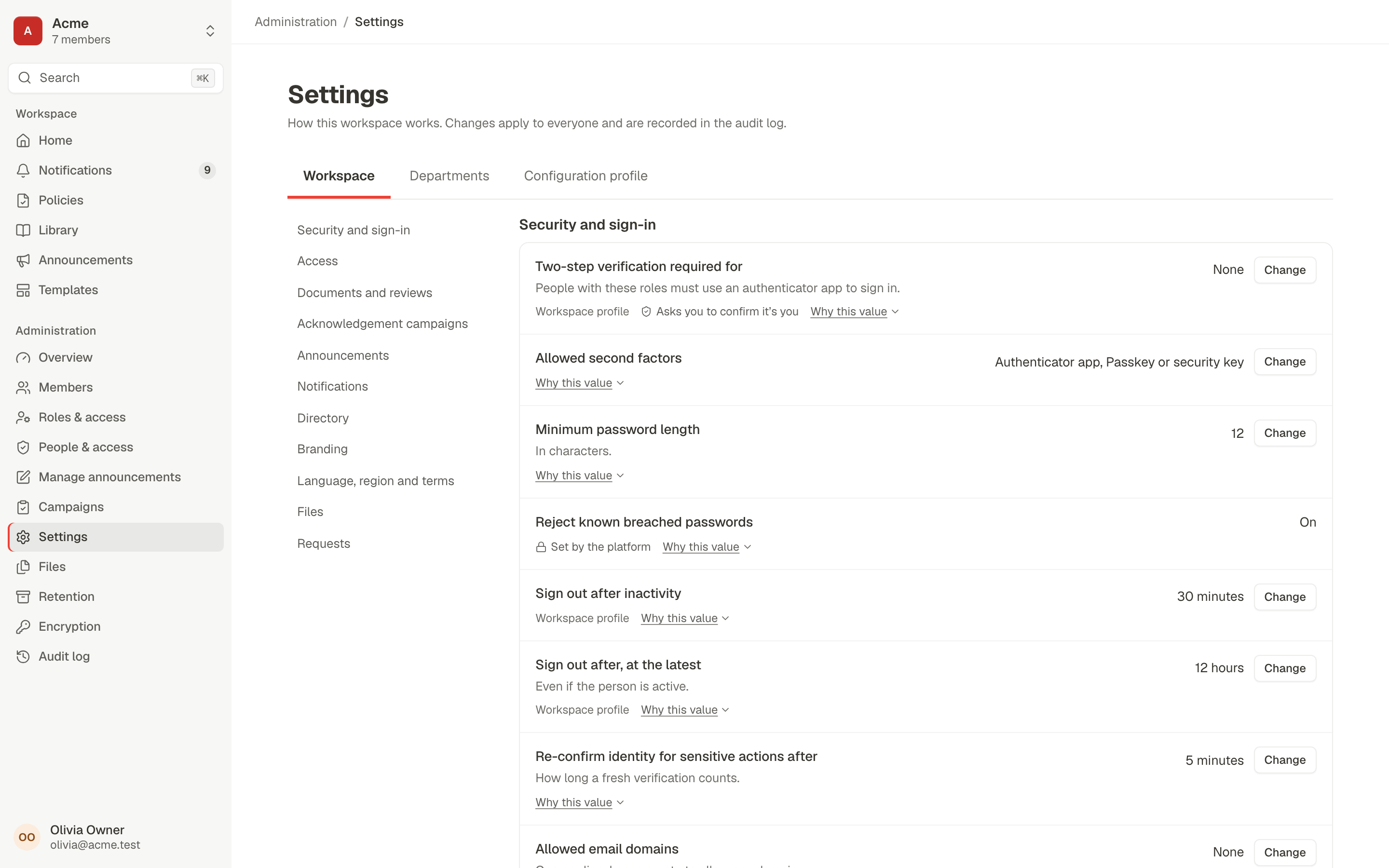
Workspace settings for security and sign-in, each value with its source and a Why this value explainer

System console

Available now

A separate plane for platform operators to manage every workspace without reading its content.

Tracker: BPMS-065 done

  • Workspaces grid with usage and quotas; suspend, reactivate or schedule deletion with step-up
  • Quota defaults per configuration profile
  • Platform health and the system audit log

SSO and SCIM

In progress

Sign in with your identity provider (OpenID Connect: Okta, Entra ID, Google, Keycloak), require it for everyone, and later provision people with SCIM 2.0.

Tracker: 0 of 2 epics done (BPMS-140, BPMS-141)

  • Single sign-on in 0.4: trusted email domains, a Sign in with SSO button, PKCE and nonce checks
  • Require SSO: passwords stop working for members; owners keep a break-glass sign-in
  • Next: SCIM 2.0 provisioning and deprovisioning within minutes, a SAML broker

API tokens and webhooks

In progress

Let scripts and other tools use Procera safely: personal API tokens limited to the permissions you pick, and signed webhooks that tell your systems when things happen.

Tracker: 0 of 2 epics done (BPMS-144, BPMS-143)

  • Personal API tokens: shown once, up to a year, revocable by you or a security admin, last use recorded
  • A token acts as you with only the permissions you chose, and never approves, acknowledges or signs
  • Webhooks for requests, documents, people and signatures: Standard Webhooks signatures, ids only, retries for a day, a delivery log with replay
  • Only public https addresses are reached: private and cloud-metadata addresses are refused, with an explicit allow-list for self-hosted internal systems

Cases and investigations

Planned · R5, Aug 2027

Case types, queues and SLAs, restricted HR cases, investigation pins, legal hold and signed evidence exports.

Tracker: BPMS-160, BPMS-161 not started; release R5 targets Aug 2027

  • Restricted cases and separation mode for confidential work
Improve

Gain insights and continuously optimize

An overview of what needs attention, every list as a data grid with saved views and exports, and reports later on.

Overduefalling

Data tables with saved views and exports

Available now

Every admin list is the same data grid: quick search, typed filters, multi-sort, saved views and exports that match what you see.

  • Filter builder with AND/OR groups and a plain-language summary
  • Saved views shared with a role, restored from a deep link
  • CSV (formula-safe) and XLSX exports, audited

Tracker: BPMS-028 done

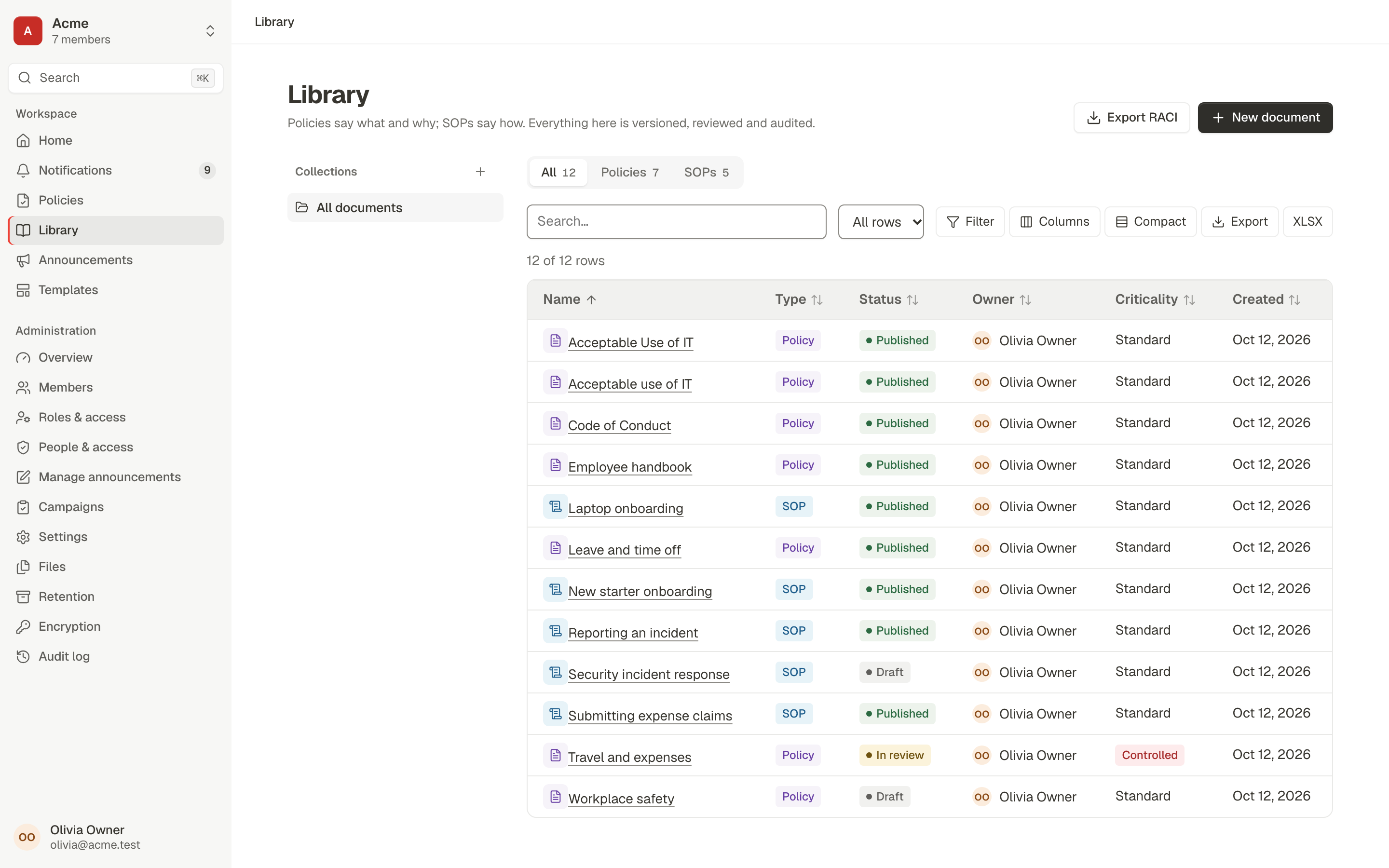
The library data grid with search, filter, columns, density and export controls above a sortable table of policies and SOPs

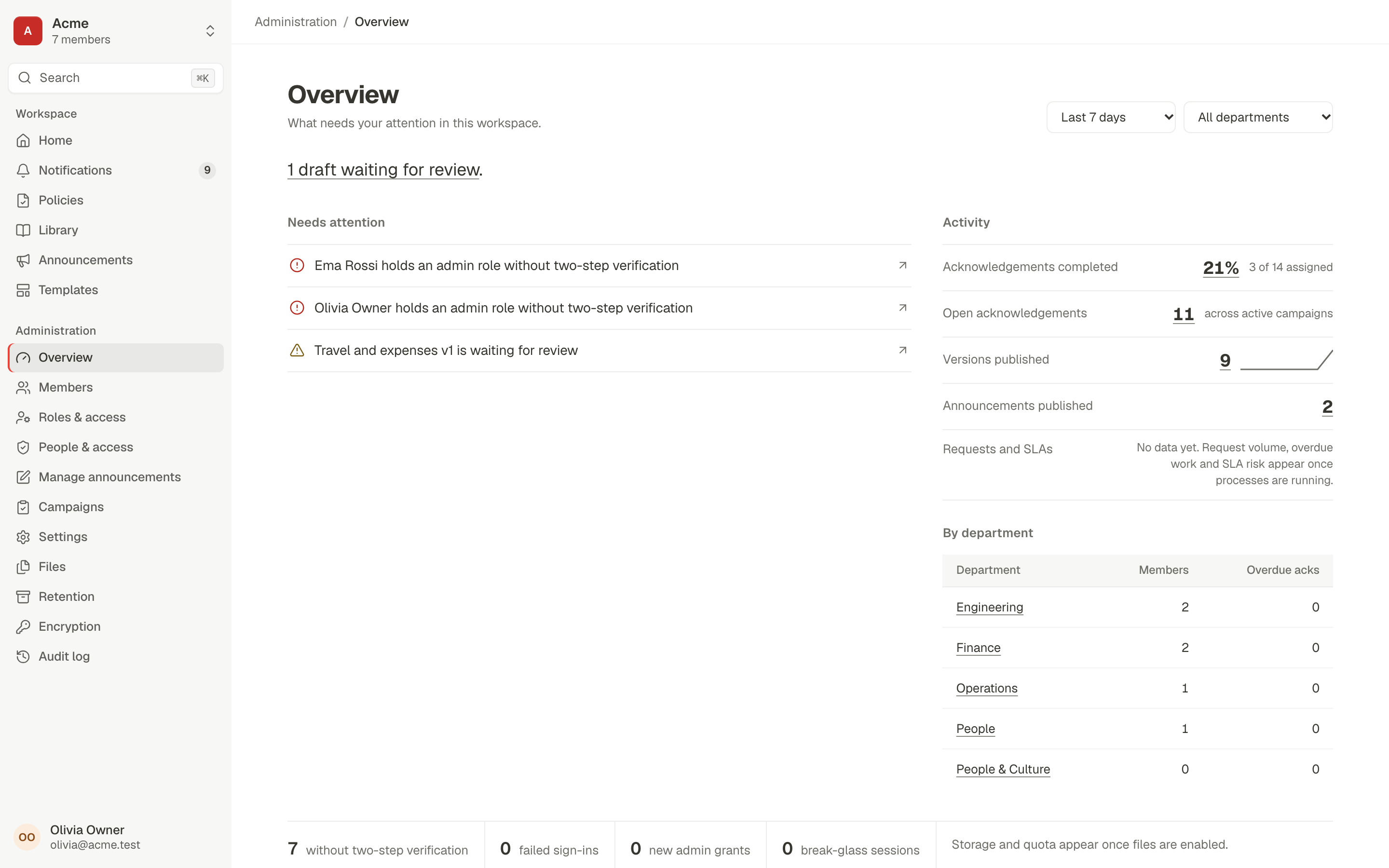
Workspace overview

Available now

A ranked list of what needs attention, with compact activity numbers. Every number drills into a pre-filtered list with the same count.

  • Overdue acknowledgements, admins without two-step verification, documents past review
  • Acknowledgement and publishing activity, by department

Tracker: BPMS-063 done

The workspace overview: items that need attention, acknowledgement and publishing activity, and a breakdown by department

Process health, SLAs and reports

In progress

All requests and work, workload, process health, then custom dashboards, a report builder and scheduled reports.

Tracker: 1 of 2 epics done (BPMS-108, BPMS-166)

  • Depends on the workflow engine

See it working, step by step

The user flows page walks through six journeys that the automated suite runs end to end in a real browser.